Otter is two products bolted together — a bot that joins your calendar calls, and a transcription engine that writes everything down. Almost every alternative keeps one half and replaces the other, which is why “Otter alternatives” lists read as incoherent: they compare a meeting participant with a text box.
Separate the job first. Dictation turns one person’s speech into text at the cursor; those tools are compared in our Wispr Flow alternatives guide. Meeting notes are a different problem — several speakers, one hour, and a structure you want afterwards. The two get sold with the same vocabulary.
Plan details below are read off the vendors’ own pricing tables, checked on 21 September 2026.
Does the tool put a bot in the call?
Otter’s pricing page says it outright: the product joins Zoom, MS Teams and Google Meet to write and share notes automatically. A named participant arrives in the room. Fireflies works the same way — its free plan advertises Zoom, Meet and Teams integrations, and the bot is the mechanism.
Granola leads with the opposite idea: “Without a meeting bot.” It captures your computer’s audio instead, so nobody joins the call, and it claims the same app coverage plus in-person conversations, which a bot structurally cannot attend. The cost is that recording only happens on a machine where Granola is installed and running, so a meeting taken on your phone captures nothing.
If your calls involve clients or candidates who would notice a participant named “Otter Assistant”, this decides the purchase before price matters — and changes who has to consent to being recorded.
What the free tier is actually counting
Three vendors, three meters, and not one of them is “minutes of audio” in a way that lines up side by side.
Otter’s entry tier is a monthly allowance: 300 minutes per user for meeting and recording transcription, explicitly with no rollover, plus free file imports capped at three for the account’s lifetime. The individual paid plan lifts that to 1,200 minutes and advertises up to 90 minutes per meeting; the team plan drops the meeting cap entirely.
Fireflies meters storage and features instead. Its free plan advertises unlimited transcription with an asterisk, but limited AI summaries and 400 minutes of storage for the entire team, against 8,000 minutes per seat once you pay. Transcripts keep arriving; the shelf you keep them on runs out.
Granola charges for time rather than volume: unlimited meeting notes on the free tier, but notes older than 30 days require an upgrade. Nothing interrupts your call — your archive just stops at last month.
So the question is not how many free minutes you get, but what happens in month three, when you want to re-read something from month one.
Where Chinese and mixed-language calls break down
Otter publishes a short list of transcription languages: English, Spanish, French, German, Japanese and Chinese. Fireflies advertises 100+ languages, and the Whisper family is multilingual by design — but language counts are not the interesting failure mode.
Our own test of the Sony WH-1000XM6 is a better guide. In a real 45-minute call switching between Chinese and English, the headphone app produced minutes with agenda, conclusions and action items separated — good enough that we skipped handwritten notes in our hands-on review — and one currency unit in the summary was wrong.
That is the pattern to plan around. Recognising code-switched speech is no longer the hard part; numbers and units still are, because a summary is a compression of what was said and a compression cannot tell you it mangled a figure. If the meeting contains quantities that matter — prices, dates, contract terms — the summary is a convenience and the transcript is the record.
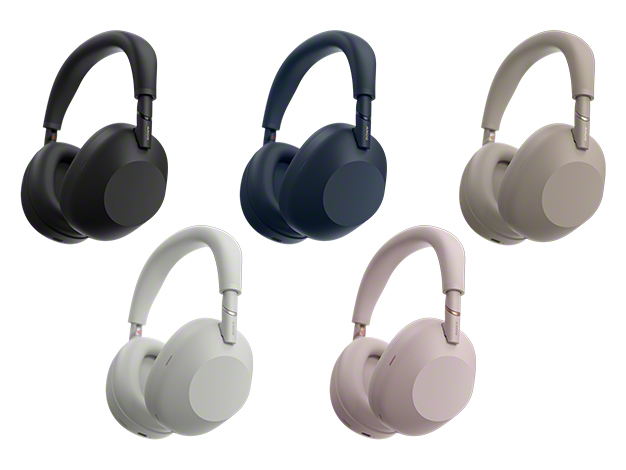
Official product image from Sony (sony.jp).
Does the audio have to leave your laptop?
This is the half of the market that comparison posts skip, and it is where the numbers are healthiest. OpenAI’s Whisper is MIT-licensed at roughly 109,000 GitHub stars; whisper.cpp, the C++ port that runs on ordinary CPUs and even a Raspberry Pi, is around 54,000 and still receiving commits this month; faster-whisper (25,000) and WhisperX (24,000) cover speed and speaker separation; Vibe (7,500) wraps the family in a desktop app.
What the setup time buys is a per-minute meter that does not exist. What you give up is the bot: these tools record and transcribe, they do not attend calls, and diarization on a four-person call is still where open tooling feels like open tooling. If you keep notes for years, where they live matters as much as how they were made — covered in the tool library.
The comparison, side by side
| Dimension | Otter.ai | Fireflies.ai | Granola | Local Whisper stack |
|---|---|---|---|---|
| Joins the call | Bot in Zoom/Teams/Meet | Bot in Zoom/Meet/Teams | No bot; captures computer audio | No bot; you record |
| Free-tier meter | 300 min/user/month, no rollover; 3 lifetime imports | 400 min storage for the team; limited summaries | Unlimited notes; 30-day history | None — compute only |
| Transcription languages | 6 listed (EN, ES, FR, DE, JA, ZH) | Advertises 100+ | Whatever your setup supports | Multilingual models, 100k+ star ecosystem |
| Where the audio goes | Vendor cloud | Vendor cloud | Vendor cloud | Stays on your machine |
| Paid entry point | ~$17/user/month monthly, less billed annually | ~$10-19/seat/month billed annually | Free tier is the entry point | Hardware and your own time |
(Details from otter.ai/pricing, fireflies.ai/pricing and granola.ai, checked 21 September 2026. Confirm on the vendors’ sites, and compare annual-billing figures rather than promotional ones.)
Pick your side
You host client calls on a laptop and a bot would be awkward. Granola, or any no-bot tool. The 30-day archive limit only matters if you never re-read old notes.
You want every calendar meeting captured without touching anything. Otter’s bot model demands the least discipline, and 300 minutes covers roughly six one-hour meetings a month. Upgrade when the 90-minute meeting cap bites, not when the monthly total does.
You record interviews, lectures or anything you will need next year. Fireflies’ storage-metered free tier, or better the local stack — a transcript on your own disk outlives a subscription.
Your meetings happen in a room, not on a call. Only a computer-audio tool or the local stack can do this at all; no amount of money fixes it on a bot-based product. The AI tools for business roundup covers the rest of that workflow.
Questions that decide the last 10%
Can I use Otter’s free plan for work calls? Yes, with two caveats: the 300 minutes do not roll over, and free file imports are capped at three for the account’s lifetime.
Do these tools work in Chinese? Otter lists Chinese among six transcription languages; Fireflies advertises over a hundred. On mixed-language calls the language list is not the risk — verify numbers and units against the transcript before sending anything onward.
Do I have to disclose a meeting bot? Practice varies by jurisdiction and by employer. Assume an unannounced recording participant is a problem; a note-taker that never joins the call removes the question.
What happens to old notes if I stop paying? Storage-based plans stop holding what you stop paying for, a lifetime import cap does not reset, and a 30-day window closes. Local transcription keeps working after cancellation.
Do I need speaker labels? Not for a two-person call. With four voices in the room, diarization decides whether a transcript is usable — WhisperX is the open-source tool aimed at that.
The call: if the meeting happens on your laptop and you want notes without a guest in the room, start with a no-bot tool. If you want automatic capture across a whole calendar, Otter and Fireflies are the same product with different meters — pick by which limit you hit first, Fireflies’ storage or Otter’s minutes. And if the meetings contain figures you cannot afford to have silently altered, keep the transcript on your own machine.
Plan details come from the official pricing pages for Otter.ai, Fireflies.ai and Granola, and repository data from the GitHub API, checked on September 21, 2026. Nothing here is our own benchmark; the only hands-on data is our XM6 meeting-summary test. For dictation see the Wispr Flow alternatives guide; for where notes should live, the Joplin entry.